Frequently Asked Questions
Select Your Model
All Questions
[Eco 3] How can I clean my FoodCycler® Grinding Bucket?
If dried food waste is stuck to the Bucket, soak in warm soapy water to remove. While the Bucket can be cleaned in the dishwasher, doing so may reduce its lifespan. If the Bucket is jammed due to food waste coagulating along the bucket interior and blades, we recommend pouring in boiling water and letting the Bucket contents soak before attempting to remove the blockage. Any residue stuck to the bucket is caused by the oil/grease or moisture content of the unit cycle. For an all-natural clean, try cycling citrus peels by themselves! This will also help to eliminate any trapped odours in the unit’s ventilation system.
It’s normal to notice some dried food debris stuck to the sides or bottom of your bucket after a cycle.
Tip: dry by-product can actually serve as a beneficial “dry mix” addition for the next cycle. As long as the grinding blade can fully rotate after emptying the Bucket, you can proceed to fill it for the next cycle.
CAUTION: Do not reach your hand into the FoodCycler® Eco 3™ Bucket, as the blades are extremely sharp.
[Eco 3] How much electricity does the unit consume?
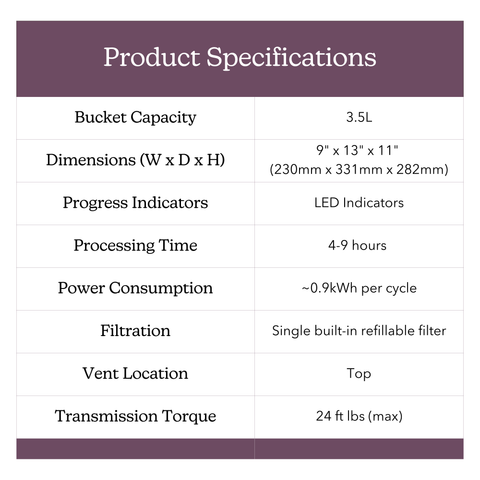
Each cycle consumes an average of 0.9 kWh per cycle, which is roughly equivalent to having a desktop computer running for the same amount of time as the cycle. Depending on where you live, each cycle should not cost you more than a couple of cents.
The FoodCycler® has built-in sensor technology that monitors the dryness and humidity of the food waste. Once complete, the unit will stop the cycle automatically.
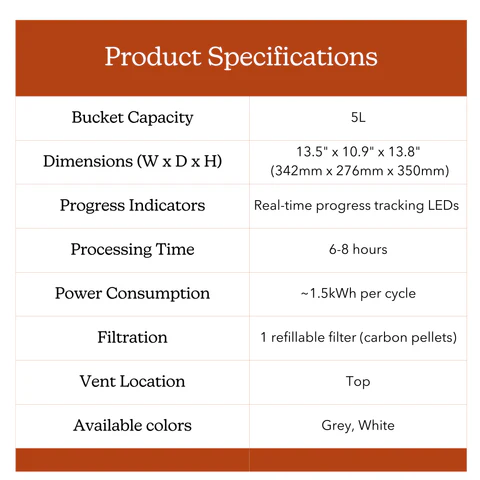
[Eco 5] What are the specifications?
[FC-30/50] What are the specifications?
[Eco 3] What are the specifications?
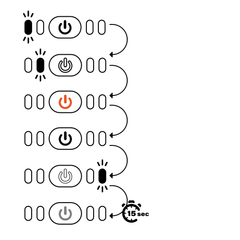
[Eco 3] How do I reset my Change Filter light?
After you replace your carbon filter pellets, press and hold the Power button for 3 seconds, release, and then hold again for another 3 seconds until you hear an audible tone to reset the Carbon Filter Replacement reminder.
[Eco 3] Why is my FoodCycler® emitting an odour?
This is normal! The unit could be emitting an odour for a variety of reasons.
The carbon filtration systems in each FoodCycler® are required to ensure a near-odourless cycle. The filters last approximately 500 cycle hours, or 3-4 months with regular use.
Even if the ‘Replace Filter’ light has not gone on yet, you may need to switch out your carbon pellets. Similarly, you can continue cycling even if the filter light has gone on and no odours are apparent.
Filter life is determined by the moisture quantity in the food waste, and the the intensity of odours of each cycle. If you are cycling rotten, smelly or potent food wastes (such as rotten meat, fish or old cheese) your filters may not last as long as if you were cycling simple veggie scraps and coffee grounds.
Tip: Running a cycle of mostly citrus peels will not only help keep your Bucket clean, it also eliminates any trapped odours in the unit’s ventilation system.
[Eco 3] How does the FoodCycler® work?
The FoodCycler® food waste recycler greatly reduces food waste volume, odors, liquids, bacteria and methane gasses that would otherwise be generated by putting your food waste in the trash.
The FoodCycler uses a multi-phase cycle which aerates and pulverizes food waste to a fine, dry, odourless powder which can be used in gardening applications.
For more details, visit our How It Works page!
[Eco 3] How much food waste can the unit cycle at one time?
3.5L (0.9 gallons)
We recommend keeping the contents below the indicator line level to avoid jams. For more information, visit the Eco 3 product page!
[Eco 3] Can I add food waste to The FoodCycler® once I’ve already started a cycle?
Yes, you can add additional food waste to the FoodCycler® Eco 3™ once the cycle has already begun. For best results, and to avoid extending the cycle period, we recommend adding food waste early in the cycle- or within the first hour and a half of cycling. Adding food waste midway through the cycle may result in unprocessed food waste at the end of the cycle, as this extends the dehydration and grinding process. If this occurs, we recommend starting a second cycle until the food waste has been completely broken down.
[Eco 3] Can The FoodCycler® process bones?
Yes, the FoodCycler® Eco 3™ can process fish, chicken, pork, lamb and other small bones. Large bones can cause jams or damage all units’ Bucket grinding gears.
[Eco 3] What can The FoodCycler® process?
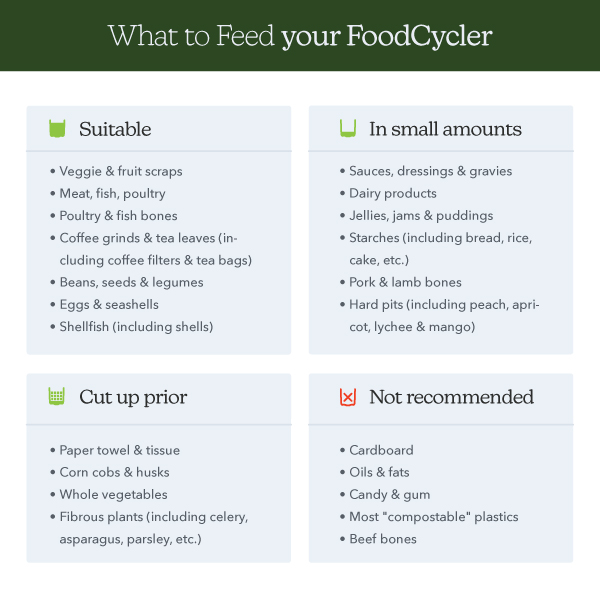
The chart below show the “Do’s & Don’ts” of FoodCycling – for more information, visit the Eco 3™ Product Page!
[Eco 5] What can I do if my Bucket is stuck inside the unit?
Stuck Bucket : Open the unit.
Secure the lid to the locked position and press Start. Let the unit run for 10-20 seconds, or until you can hear the grinding arms start to turn. You can pause the cycle by opening the unit lid, and try removing the Bucket.
If unsuccessful, check the food content. Is it a solid mass? If so, proceed to step 3. If not,
You may need to loosen the by-product inside the Bucket. Unplug your unit, add boiling water to the Bucket, enough to submerge the solid contents. Let the Bucket sit for a period of approximately 10 minutes. Using a long plastic or wooden utensil, attempt to shift the Bucket contents so as to free the blockage from the grinding arm. Run the cycle again for 10-20 seconds, and try again to remove the Bucket.
[Eco 5] What do I do if my FoodCycler® is malfunctioning?
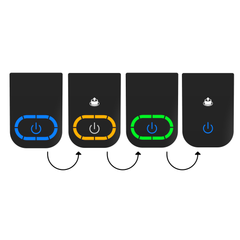
Prior to seeking customer support, we recommend that customers try a few troubleshooting steps on their own. Please reference the Error Codes document below. If your unit is displaying codes 1-6, please read the section(s) below respective to the code you’re seeing. For codes 7-12, please reach out to Customer Support directly at support@foodcycler.com so that we can assist you further.
This code sequence occurs at the beginning of your cycle. No action is required – your unit is running normally!
This indicates that your unit is plugged in. No action required.
Blue lights along the LED track indicate that the unit is running a cycle: the LED track displays cycle progress. No action required.
This sensor indicates that your Carbon Filter pellets are ready to be replaced OR that 500 cycle hours have elapsed since you last reset you filters. If the sensor goes off, but you are not experiencing odors, you may continue to run your unit as usual. The Change Filter light is merely an indicator that 500 cycle hours have elapsed.
This sensor indicates that your unit is experiencing temperatures which are either too high or too low for it to run efficiently (within 0°-60° C (32º-140º F). Try moving the unit to a room-temperature environment and attempt to run another cycle. If the error code persists, please contact Customer Support at support@foodcycler.com.
This sensor indicates that your unit is experiencing a motor overload. If this is caused by a blockage in the Bucket, try the following steps: 1) If the Bucket is jammed due to food waste coagulating along the Bucket interior and blades, we recommend pouring boiling water into the bucket and letting the Bucket contents soak for about 10 minutes. 2) Attempt to dislodge the blockage with a tool or kitchen implement (the Bucket blades are extremely sharp). If the error code persists, please contact Customer Support at support@foodcycler.com.
[Eco 5] What do I do if my FoodCycler® is malfunctioning?
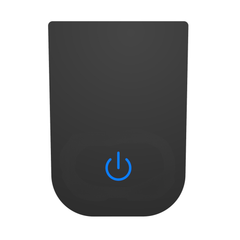
Prior to seeking customer support, we recommend that customers try a few troubleshooting steps on their own. Please reference the Error Codes document below. If your unit is displaying codes 1-4, please read the section(s) below respective to the code you’re seeing. For codes 5-11, please reach out to Customer Support directly at support@foodcycler.com so that we can assist you further.
This code sequence occurs at the beginning of your cycle. No action is required – your unit is running normally!
This sensor indicates that your Carbon Filter pellets are ready to be replaced OR that 500 cycle hours have elapsed since you last reset your filters. If the sensor goes off, but you are not experiencing odours, you may continue to run your unit as usual. The Change Filter light is merely an indicator that 500 cycle hours have elapsed.
This sensor indicates that your unit is experiencing temperatures which are either too high or too low for it to run efficiently (within 0°-60° C (32º-140º F). Try moving the unit to a room-temperature environment and attempt to run another cycle. If the error code persists, please contact Customer Support at support@foodcycler.com.
This sensor indicates that your unit is experiencing a motor overload. If this is caused by a blockage in the Bucket, try the following steps: 1) If the Bucket is jammed due to food waste coagulating along the Bucket interior and blades, we recommend pouring boiling water into the bucket and letting the Bucket contents soak for about 10 minutes. 2) Attempt to dislodge the blockage with a tool or kitchen implement (CAUTION: do not use your hands to dislodge the blockage as the Bucket blades are extremely sharp and may cause injury). If the error code persists, please contact Customer Support at support@foodcycler.com.
How long does The FoodCycler® cycle last?
All FoodCycler® units will complete a cycle within approximately 4-9 hours.
The time needed depends on the amount of food waste being processed, the density of the food wastes and the moisture levels contained in each.
What is Vortech™?
The Vortech™ grinding system utilizes a multi-blade steel rotary system that effectively pulverizes a wide variety of soft and hard food waste scraps, transforming them into smaller, dried granules. The flow stream that powers the turning system, pushes the food scraps into walls of the container, breaking down and squeezing the pulp further to the bottom, while removing moisture, processing the matter into a fine dry substance. The resulting by-product contains rich nutrients that can be added to soil as an amendment for gardening uses.
How long do the filters last?
The carbon filters last between 3-4 months with regular use, or 500 cycle hours. The life expectancy of the carbon filters is determined by the moisture content of the food waste, and the natural odours of the food waste. Denser, wetter and smellier food wastes will go through filters much faster than simple veggie scraps and egg shells.
Can I recycle my filters/bucket?
FoodCycler® products use a refillable filter system, which means that you can keep using your filters indefinitely and simply replace the carbon itself when they are ready to be changed. The filter carbon is a harmless organic material, and can be safely disposed of in your regular trash or organics collection bin. Please follow your municipal waste guidelines in disposing of your used carbon. Buckets can be recycled through your local metal scrap collection service.
How can I store my by-product during the winter?
Your by-product can be safely stored after your cycle in a closed container safe from moisture until you are ready to use it!
What can I do with my FoodCycler® by-product (Foodilizer™)?
Foodilizer is a light, dry, nearly bacteria-free nutrient-rich soil amendment which can be used in gardening applications.
You can also check out our FoodCycler® 101 articles below to learn how you can use your Foodilizer in the garden.
Composting with Foodilizer: How to Supercharge Your Compost Game the Easy Way
The Science Behind FoodCycler®: FoodCycler & Foodilizer Explained
Will methane gases be produced during the cycle?
Methane gas is emitted during the decomposition process of organic materials in an anaerobic (“no air”) environment. Methane is 28 times more insulative of atmospheric heat than CO₂, and is therefore a huge contributing force to global climate change. Since the FoodCycler® aerates the food waste while heating and pulverizing (an aerobic environment), those environmentally damaging methane gases are not produced during the cycle.
How does the FoodCycler® work?
The FoodCycler® food waste recycler greatly reduces food waste volume, odors, liquids, bacteria and eliminates methane gasses that would otherwise be generated by putting your food waste in the trash.
The FoodCycler uses a multi-phase cycle, which aerates and pulverizes food waste to a fine, dry, odourless powder which can be used in gardening applications.
What can I do if my Bucket won't fit inside the unit?
When inserting your Bucket:
- Hold onto the Bucket handle tightly.
- Insert the Bucket into the unit cavity.
- Rotate the Bucket to the right or left until it drops into place, and sits level with the top of the FoodCycler opening.
- If the Bucket does not sit flush in the unit, twist the Bucket slightly in small rotations of up to 60° in each direction until it seats correctly.
For all other unit inquiries, please contact Customer Support.
Can I empty the Bucket as soon as the unit finishes its cycle?
Once the unit beeps and/or shuts off following a cycle, the Bucket is safe to handle – though may still be quite warm. Please exercise caution when handling the Bucket directly after a cycle.
Can I run my FoodCycler® in the garage?
Yes you can! Like most appliances, the FoodCycler® is not intended to function in below-freezing temperatures. The FoodCycler® must be in a closed, dry environment where there is no risk of it being rained on or otherwise subjected to the elements.
[FC-30/50] What can The FoodCycler® process?
The chart below show the FC-30 “Do’s & Don’ts” – for more information, visit the FC-30 Product Page!

[FC-30/50] What can I do if my Bucket is stuck inside the unit?
- Secure the lid to the locked position and press Start. Let the unit run for 10-20 seconds, or until you can hear the grinding arms start to turn. You can pause the cycle by opening the unit lid, and try removing the Bucket.
- If unsuccessful, check the food content. Is it solid and won’t budge? If so do not try step 1 again, but proceed to the next step.
- You may need to loosen the end product inside the Bucket. Unplug your unit, add boiling water to the Bucket, enough to moisten the contents. Let the Bucket it sit for about ten minutes. Using a long kitchen utensil, move the Bucket contents around to free it from the grinding arm. Now try the cycle again for 10-20 seconds, and try removing the Bucket.
- If unsuccessful, repeat step 4 until the Bucket gear disengages.
[FC-30/50] What do I do if my FoodCycler® is malfunctioning?
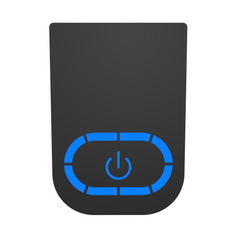
Prior to seeking customer support, we recommend that customers try a few troubleshooting steps on their own:
Manual Reset (manually shutting down the unit to reset to its original program settings)
- Ensure that the unit is plugged in.
- Press and hold the Start/Power button for three seconds, or until you hear a beep. The unit should shut off if it was “on”.
- Unplug the unit and wait one minute.
- Plug the unit back in and wait ten seconds.
- Press Start/Power once, as you normally would to start a cycle.
[FC-30/50] How can I clean my FoodCycler® Grinding Bucket?
If dried food waste is stuck to the Bucket, soak in warm soapy water to remove. While the Bucket can be cleaned in the dishwasher, doing so may reduce its lifespan. If the Bucket is jammed due to food waste coagulating along the bucket interior and blades, we recommend pouring in boiling water and letting the Bucket contents soak before attempting to remove the blockage. Any residue stuck to the Bucket is caused by the oil/grease or moisture content of the unit cycle. For an all-natural clean, try cycling citrus peels by themselves! This will also help to eliminate any trapped odors in the unit’s ventilation system.
It’s normal to notice some dried food debris stuck to the sides or bottom of your Bucket after a cycle.
Tip: dry by-product can actually serve as a beneficial “dry mix” addition for the next cycle. As long as the grinding blade can fully rotate after emptying the Bucket, you can proceed to fill it for the next cycle.
[FC-30/50] How much electricity does the unit consume?
Each cycle consumes an average of 0.9 kWh per cycle, which is roughly equivalent to having a desktop computer running for the same amount of time as the cycle. Depending on where you live, each cycle should not cost you more than a couple of cents.
The FoodCycler® has built-in sensor technology that monitors the dryness and humidity of the food waste. Once complete, the unit will stop the cycle automatically.
[FC-30/50] How do I reset my Change Filter light?
- Remove the back panel of the unit and feel along the upper, inner ledge of the unit cavity (directly above where it says Reset Filter light when the back panel is in place) until you find a small round button.
- Press and hold for upwards of 3 seconds until you hear a beep. The filter light should turn off!
[FC-30/50] Why is my FoodCycler® emitting an odour?
This is normal! The unit could be emitting an odor for a variety of reasons.
The carbon filtration systems in each FoodCycler® are required to ensure a near-odorless cycle. They last approximately 500 cycle hours, or 3-4 months with regular use.
Even if the ‘Replace Filter’ light has not gone on yet, you may need to switch out your filter carbon. Similarly, you can continue cycling even if the filter light has gone on and no odors are apparent.
Filter life is determined by the moisture quantity in the food waste, and the natural odorousness of each cycle. If you are cycling rotten, smelly or potent food wastes (such as rotting food scraps, fish or old cheese) your filters may not last as long as if you were cycling simple veggie scraps and coffee grounds.
Tip: Running a cycle of mostly citrus peels will not only help keep your Bucket clean, it also eliminates any trapped odours in the unit’s ventilation system.
[FC-30/50] How does the FoodCycler® work?
The FoodCycler® food waste recycler greatly reduces food waste volume, odors, liquids, bacteria and methane gasses that would otherwise be generated by putting your food waste in the trash.
The FoodCycler uses a three-phase cycle which aerates and pulverizes food waste to a fine, dry, odourless powder which can be used in gardening applications.
For more details, visit our How It Works page!
[FC-30/50] How much food waste can the unit cycle at one time?
2.5L (0.66 gallons)
We recommend keeping the contents below the indicator line level to avoid jams. For more information, visit the FC-30 product page!
[FC-30/50] Can I add food waste to The FoodCycler® once I’ve already started a cycle?
Yes, you can add additional food waste to the FoodCycler® FC-30™ once the cycle has already begun. For best results and to avoid extending the cycle period, we recommend adding food waste early in the cycle – or within the first hour and a half of cycling. Adding food waste midway through the cycle may result in unprocessed food waste at the end of the cycle, as this extends the dehydration and grinding process. If this occurs, we recommend starting a second cycle until the food waste has been completely broken down.
[FC-30/50] Can The FoodCycler® process bones?
Yes, the FoodCycler® FC-30 can process fish and chicken bones. Large bones may cause jams or damage the unit’s Bucket grinding gears.
[Eco 5] How can I clean my FoodCycler® Grinding Bucket?
If dried food waste is stuck to the Bucket, soak in warm soapy water to remove. While the Bucket can be cleaned in the dishwasher, doing so may reduce its lifespan. If the Bucket is jammed due to food waste coagulating along the Bucket interior and blades, we recommend pouring in boiling water and letting the Bucket contents soak before attempting to remove the blockage. Any residue stuck to the Bucket is caused by the oil/grease or moisture content of the unit cycle. For an all-natural clean, try cycling citrus peels by themselves! This will also help to eliminate any trapped odours in the unit’s ventilation system.
It’s normal to notice some dried food debris stuck to the sides or bottom of your Bucket after a cycle.
Tip: dry by-product can actually serve as a beneficial “dry mix” addition for the next cycle. As long as the grinding blade can fully rotate after emptying the Bucket, you can proceed to fill it for the next cycle.
CAUTION: Do not reach your hand into the FoodCycler® Eco 5™ Bucket, as the blades are extremely sharp.
[Eco 5] How much electricity does the unit consume?
Each cycle consumes an average of 1.5 kWh per cycle, which is roughly equivalent to having a desktop computer running for the same amount of time as the cycle. Depending on where you live, each cycle should not cost you more than a couple of cents.
The FoodCycler® has built-in sensor technology that monitors the dryness and humidity of the food waste. Once complete, the unit will stop the cycle automatically.
[Eco 5] How much electricity does the unit consume?
Each cycle consumes an average of 1.5 kWh per cycle, which is roughly equivalent to having a desktop computer running for the same amount of time as the cycle. Depending on where you live, each cycle should not cost you more than a couple of cents.
The FoodCycler® has built-in sensor technology that monitors the dryness and humidity of the food waste. Once complete, the unit will stop the cycle automatically.
[Eco 5] How do I reset my Change Filter light?
After you replace your carbon filter pellets, press and hold the Power button for 3 seconds, release, and then hold again for another 3 seconds until you hear an audible tone to reset the Carbon Filter Replacement reminder.
[Eco 5] Why is my FoodCycler® emitting an odour?
This is normal! The unit could be emitting an odour for a variety of reasons.
The carbon filtration systems in each FoodCycler® are required to ensure a near-odourless cycle. They last approximately 500 cycle hours, or 3-4 months with regular use.
Even if the ‘Replace Filter’ light has not gone on yet, you may need to switch out your filter carbon. Similarly, you can continue cycling even if the filter light has gone on and no odours are apparent.
Filter life is determined by the moisture quantity in the food waste, and the intensity of odours of each cycle. If you are cycling rotten, smelly or potent food wastes (such as rotten meat, fish or old cheese) your filters may not last as long as if you were cycling simple veggie scraps and coffee grounds.
Tip: Running a cycle of mostly citrus peels will not only help keep your Bucket clean, it also eliminates any trapped odours in the unit’s ventilation system.
[Eco 5] How does the FoodCycler® work?
The FoodCycler® food waste recycler greatly reduces food waste volume, odors, liquids, bacteria and methane gasses that would otherwise be generated by putting your food waste in the trash.
The FoodCycler uses a multi-phase cycle which aerates and pulverizes food waste to a fine, dry, odourless powder which can be used in gardening applications.
For more details, visit our How It Works page!
[Eco 5] How much food waste can the unit cycle at one time?
5L (1.3 gallons)
We recommend keeping the contents below the indicator line level to avoid jams. For more information, visit the Eco 5 product page!
[Eco 5] Can I add food waste to The FoodCycler® once I’ve already started a cycle?
Yes, you can add additional food waste to the FoodCycler® Eco 5™ once the cycle has already begun. For best results, and to avoid extending the cycle period, we recommend adding food waste early in the cycle- or within the first hour and a half of cycling. Adding food waste midway through the cycle may result in unprocessed food waste at the end of the cycle, as this extends the dehydration and grinding process. If this occurs, we recommend starting a second cycle until the food waste has been completely broken down.
[Eco 5] Can The FoodCycler® process bones?
Yes, the FoodCycler® Eco 5™ can process fish, chicken, pork, lamb and other small bones. Large bones can cause jams or damage all units’ Bucket grinding gears.
[Eco 5] What can The FoodCycler® process?
The chart below show the “Do’s & Don’ts” of FoodCycling – for more information, visit the Eco 5™ Product Page!
What’s the difference between The Original FoodCycler® FC-50 and the new FoodCycler® Eco 5™ by Vitamix® ?
| Eco 5™: Bucket capacity: 5L Unit volume: 28.9L Recommended Household Size: 3+ Dimensions: (H) 13.8” X (W) 13.8” X (D) 10.3” Progress indicators: real-time progress tracking LEDs Processing time: 4-9 hours (overnight) Power consumption: <0.35kWh/L (<1.5kWh/cycle) Filtration: 1 reusable filter (Carbon pellets) Vent location: top | FC-50: Bucket capacity: < 2.5L Unit volume: Approx. 30.5L Recommended Household Size: 1-2 Dimensions: (H) 14.2” X (W) 11” X (D) 12.6” Progress indicators: 3 phase LEDs Processing time: 4-8 hours (overnight) Power consumption: Approx. 0.8kWh / cycle Filtration: 2 reusable filters Vent location: back |
What happens to the methane gases during the cycle?
Methane gas is emitted during the decomposition process of organic materials in an anaerobic (“no air”) environment. Methane is 30 times more insulative of atmospheric heat than CO₂, and is therefore a huge contributing force to global climate change. Since the FoodCycler® aerates the food waste while heating and pulverizing (an aerobic environment), those environmentally damaging methane gases are not produced at all.
How much electricity does the unit consume?
Each cycle consumes approximately 0.8-1.5 kWh per cycle, which is roughly equivalent to having a desktop computer running for the same amount of time as the cycle. Depending on where you live, each cycle should not cost you more than a couple of cents.
The FoodCycler® has built-in sensor technology that monitors the dryness and humidity of the food waste. Once complete, the unit will stop the cycle automatically.
What can’t FoodCycler® process?
- Hard, dense bones (beef, pork, lamb and bison)
- Candy or gum
- Cooking oils and greases
- Hard pits (peaches, apricots, nectarines)
- Nuts and other hard shells
- Pineapple leaves
- Watermelon rinds
Can I run my FoodCycler® in the garage?
Yes you can! Please be aware that, like most appliances, the FoodCycler® is not intended to function in below-freezing temperatures. The FoodCycler® must be in a closed, dry environment where there is no risk of it being rained on or otherwise subjected to the elements.
How can I store my by-product during the winter?
Your by-product can be stored after your cycle in an open-air container for a period of one week. After this one-week period, you can store the by-product for up to a year in a closed-top container, if preferred.
Cut up prior to cycling:
- Fibrous herbs & plants (celery, parsley, etc.)
- Corn cobs & husks
- Paper towels/tissue
- Pineapple leaves
- Whole fruits & vegetables
In limited quantities?
- Cake
- Rice
- Bread
- Pasta
- High sugar fruits (grapes, bananas, melon, oranges and pineapple)
- Sauces
- Jams
- Jellies
- Peanut butter
How long does The FoodCycler® cycle last?
In the Eco 5™ FoodCycler®, a typical cycle takes between 4-9 hours for the food waste to become completely dehydrated and processed into the by-product
For the FC-30 and FC-50 units 4-8 hours (with an average of 5 hours) for the food waste to become completely dehydrated and processed.
The time needed depends on the amount of food waste being processed, the density of the food wastes and the moisture levels contained in each. Please note that these estimates exclude the unit’s cooling time which lasts less than a half hour on average.
Can I open the lid on The FoodCycler® during the process to see what’s going on?
We advise that you keep the lid closed til the cycle is complete to prevent the cycle from being prematurely or improperly finished, or from lasting longer than usual. The only exception is if you add more food waste to the unit while it is recycling, but we strongly recommend that you take care when opening the lid mid-cycle as the food waste and bucket get very hot during the process so it is strongly recommended to keep the lid shut.
How long do the filters last?
The carbon filters last between 3-4 months with regular use, or 500 cycle hours. The life expectancy of the carbon filters is determined by the moisture content of the food waste, and the natural odours of the food waste. Denser, wetter and smellier food wastes will go through filters much faster than simple veggie scraps and egg shells.
Can The FoodCycler® process bones?
Yes, the FoodCycler® Eco 5TMcan process fish, chicken, pork, lamb and other small bones, while the FoodCycler® FC-30 and FC-50 can process fish and chicken bones. Large bones can cause jams or damage all units’ bucket grinding gears.
How can I clean my FoodCycler® grinding bucket?
The removable grinding bucket is dishwasher-safe. However, you don’t really need to clean it at all! If the bucket is not jammed with processed food waste, you can simply continue to add food waste to the bucket and cycle as usual. Any residue stuck to the bucket is almost always a cosmetic issue, and caused by the oil/grease or moisture content of the unit cycle. For an all-natural clean, try cycling citrus peels by themselves! This will also help to eliminate any trapped odors in the unit’s ventilation system.
If dried food waste is stuck to the bucket, soak in warm soapy water to remove.
CAUTION: Do not reach your hand into the FoodCycler® Eco 5TM bucket, as the blades are extremely sharp.
Why is my FoodCycler® emitting an odor?
The unit could be emitting an odor for a variety of reasons.
The carbon filters are required to ensure a near-odorless cycle. They last approximately 500 cycle hours, or 3-4 months with regular use.
Even if the ‘replace filter’ light has not gone on yet, you may need to switch out your filter carbon. Similarly, you can continue cycling even if the filter light has gone on and no odours are apparent.
Filter life is determined by the moisture quantity in the food waste, and the natural odorosness of each cycle. If you are cycling rotten, smelly or potent food wastes (such as rotten meat, or old cheese) your filters may not last as long as if you were cycling simple veggie scraps and coffee grounds.
Can I empty the bucket as soon as the unit finishes its cycle?
Once the unit beeps and/or shuts off following a cycle, the Bucket is safe to handle – though may still be quite warm. Please exercise caution when handling the bucket directly after a cycle.
What are the 3 stages of the Cycle - Drying, Grinding, Cooling?
The drying phase is focused on removing moisture from your food waste.
The grinding phase continues the drying process, removing any remaining moisture, while the bucket grinding blades agitate and pulverize the food waste.
The cooling phase is a safety measure to return the processed food waste to near-room temperature, making it safe to handle. Power usage is minimal during the cooling phase.
*PLEASE DO NOT SKIP THE COOLING CYCLE. It is for your safety and for the safe handling of your FoodCycler® and grinding Bucket.
Can I add food waste to The FoodCycler® once I’ve already started a cycle?
You can add additional food waste to the FoodCycler® Eco 5TM once the cycle has already begun, preferably early in the drying or grinding phases. Adding food waste midway through the cycle may result in unprocessed food waste at the end of the cycle, as this extends the dehydration and grinding process. If this occurs, we recommend starting a second cycle until the food waste has been completely broken down.
Can I open the lid on The FoodCycler® during the process to see what's going on?
We advise that you keep the lid closed til the cycle is complete to prevent the cycle from being prematurely or improperly finished, or from lasting longer than usual. The only exception is if you add more food waste to the unit while it is recycling, but we strongly recommend that you take care when opening the lid mid-cycle as the food waste and bucket get very hot during the process so it is strongly recommended to keep the lid shut.
How much food waste can the unit cycle at one time?
The NEW FoodCycler® Eco 5TM has a 5L Bucket capacity.
The FC-30 and FC-50 units have a 2.5 liter Bucket capacity. We recommend keeping the contents below the indicator line level to avoid jams.
What are the specifications?
The FoodCycler® Eco 5TM
Bucket capacity: 5L
Unit volume: 28.9L
Dimensions: (H) 13.8” X (W) 13.8” X (D) 10.3”
Progress indicators: real-time progress tracking LEDs
Processing time: 4-9 hours (overnight)
Power consumption: <0.35kWh/L (<1.5kWh/cycle)
Filtration: 1 reusable filter (Carbon pellets)
Vent location: top
Transmission torque: 24 ft. lbs max
The FoodCycler® FC-30 or FC-50
Dimensions: (W)12.6 ” x (H) 14.2 ” x (L) 13 “
Weight: (In box) 24 lbs, (out of box) 19 lbs
Can I recycle my filters/bucket?
FoodCycler® products use a refillable filter system, which means that you can keep using your filters indefinitely and simply replace the carbon itself when they are ready to be changed. The filter carbon is a harmless organic material, and can be safely disposed of in your regular trash. Buckets can be recycled through your local metal scrap collection service.
What can The FoodCycler® process?
- Most fruit and vegetable scraps
- Meat, shellfish, and poultry scraps
- Cheese
- Beans, seeds, and legumes
- Chicken and fish bones/shells
- Coffee grounds, filters, and tea bags
- Eggs and eggshells
What do I do if my FoodCycler® is malfunctioning?
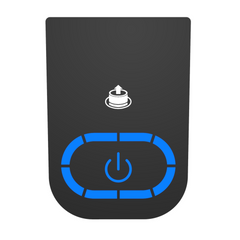
Prior to seeking customer support, we recommend that customers try a few troubleshooting steps on their own:
FoodCycler® FC-30:
Manual Reset (manually shutting down the unit to reset to its original program settings)
- Ensure that the unit is plugged in.
- Press and hold the Start/Power button for three seconds, or until you hear a beep. The unit should shut off if it was “on”.
- Unplug the unit and wait one minute.
- Plug the unit back in and wait ten seconds.
- Press Start/Power once, as you normally would to start a cycle.
- You’re done! If the unit is still malfunctioning in some way, please contact FoodCycler™’s Customer Support Team.
Question about the Eco 3
[Eco 3] How can I clean my FoodCycler® Grinding Bucket?
If dried food waste is stuck to the Bucket, soak in warm soapy water to remove. While the Bucket can be cleaned in the dishwasher, doing so may reduce its lifespan. If the Bucket is jammed due to food waste coagulating along the bucket interior and blades, we recommend pouring in boiling water and letting the Bucket contents soak before attempting to remove the blockage. Any residue stuck to the bucket is caused by the oil/grease or moisture content of the unit cycle. For an all-natural clean, try cycling citrus peels by themselves! This will also help to eliminate any trapped odours in the unit’s ventilation system.
It’s normal to notice some dried food debris stuck to the sides or bottom of your bucket after a cycle.
Tip: dry by-product can actually serve as a beneficial “dry mix” addition for the next cycle. As long as the grinding blade can fully rotate after emptying the Bucket, you can proceed to fill it for the next cycle.
CAUTION: Do not reach your hand into the FoodCycler® Eco 3™ Bucket, as the blades are extremely sharp.
[Eco 3] How much electricity does the unit consume?
Each cycle consumes an average of 0.9 kWh per cycle, which is roughly equivalent to having a desktop computer running for the same amount of time as the cycle. Depending on where you live, each cycle should not cost you more than a couple of cents.
The FoodCycler® has built-in sensor technology that monitors the dryness and humidity of the food waste. Once complete, the unit will stop the cycle automatically.
[Eco 3] What are the specifications?
[Eco 3] How do I reset my Change Filter light?
After you replace your carbon filter pellets, press and hold the Power button for 3 seconds, release, and then hold again for another 3 seconds until you hear an audible tone to reset the Carbon Filter Replacement reminder.
[Eco 3] Why is my FoodCycler® emitting an odour?
This is normal! The unit could be emitting an odour for a variety of reasons.
The carbon filtration systems in each FoodCycler® are required to ensure a near-odourless cycle. The filters last approximately 500 cycle hours, or 3-4 months with regular use.
Even if the ‘Replace Filter’ light has not gone on yet, you may need to switch out your carbon pellets. Similarly, you can continue cycling even if the filter light has gone on and no odours are apparent.
Filter life is determined by the moisture quantity in the food waste, and the the intensity of odours of each cycle. If you are cycling rotten, smelly or potent food wastes (such as rotten meat, fish or old cheese) your filters may not last as long as if you were cycling simple veggie scraps and coffee grounds.
Tip: Running a cycle of mostly citrus peels will not only help keep your Bucket clean, it also eliminates any trapped odours in the unit’s ventilation system.
[Eco 3] How does the FoodCycler® work?
The FoodCycler® food waste recycler greatly reduces food waste volume, odors, liquids, bacteria and methane gasses that would otherwise be generated by putting your food waste in the trash.
The FoodCycler uses a multi-phase cycle which aerates and pulverizes food waste to a fine, dry, odourless powder which can be used in gardening applications.
For more details, visit our How It Works page!
[Eco 3] How much food waste can the unit cycle at one time?
3.5L (0.9 gallons)
We recommend keeping the contents below the indicator line level to avoid jams. For more information, visit the Eco 3 product page!
[Eco 3] Can I add food waste to The FoodCycler® once I’ve already started a cycle?
Yes, you can add additional food waste to the FoodCycler® Eco 3™ once the cycle has already begun. For best results, and to avoid extending the cycle period, we recommend adding food waste early in the cycle- or within the first hour and a half of cycling. Adding food waste midway through the cycle may result in unprocessed food waste at the end of the cycle, as this extends the dehydration and grinding process. If this occurs, we recommend starting a second cycle until the food waste has been completely broken down.
[Eco 3] Can The FoodCycler® process bones?
Yes, the FoodCycler® Eco 3™ can process fish, chicken, pork, lamb and other small bones. Large bones can cause jams or damage all units’ Bucket grinding gears.
[Eco 3] What can The FoodCycler® process?
The chart below show the “Do’s & Don’ts” of FoodCycling – for more information, visit the Eco 3™ Product Page!
Question about the Eco 5
[Eco 5] What are the specifications?
[Eco 5] What can I do if my Bucket is stuck inside the unit?
Stuck Bucket : Open the unit.
Secure the lid to the locked position and press Start. Let the unit run for 10-20 seconds, or until you can hear the grinding arms start to turn. You can pause the cycle by opening the unit lid, and try removing the Bucket.
If unsuccessful, check the food content. Is it a solid mass? If so, proceed to step 3. If not,
You may need to loosen the by-product inside the Bucket. Unplug your unit, add boiling water to the Bucket, enough to submerge the solid contents. Let the Bucket sit for a period of approximately 10 minutes. Using a long plastic or wooden utensil, attempt to shift the Bucket contents so as to free the blockage from the grinding arm. Run the cycle again for 10-20 seconds, and try again to remove the Bucket.
[Eco 5] What do I do if my FoodCycler® is malfunctioning?
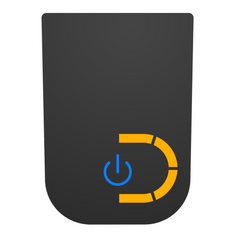
Prior to seeking customer support, we recommend that customers try a few troubleshooting steps on their own. Please reference the Error Codes document below. If your unit is displaying codes 1-6, please read the section(s) below respective to the code you’re seeing. For codes 7-12, please reach out to Customer Support directly at support@foodcycler.com so that we can assist you further.
This code sequence occurs at the beginning of your cycle. No action is required – your unit is running normally!
This indicates that your unit is plugged in. No action required.
Blue lights along the LED track indicate that the unit is running a cycle: the LED track displays cycle progress. No action required.
This sensor indicates that your Carbon Filter pellets are ready to be replaced OR that 500 cycle hours have elapsed since you last reset you filters. If the sensor goes off, but you are not experiencing odors, you may continue to run your unit as usual. The Change Filter light is merely an indicator that 500 cycle hours have elapsed.
This sensor indicates that your unit is experiencing temperatures which are either too high or too low for it to run efficiently (within 0°-60° C (32º-140º F). Try moving the unit to a room-temperature environment and attempt to run another cycle. If the error code persists, please contact Customer Support at support@foodcycler.com.
This sensor indicates that your unit is experiencing a motor overload. If this is caused by a blockage in the Bucket, try the following steps: 1) If the Bucket is jammed due to food waste coagulating along the Bucket interior and blades, we recommend pouring boiling water into the bucket and letting the Bucket contents soak for about 10 minutes. 2) Attempt to dislodge the blockage with a tool or kitchen implement (the Bucket blades are extremely sharp). If the error code persists, please contact Customer Support at support@foodcycler.com.
[Eco 5] What do I do if my FoodCycler® is malfunctioning?
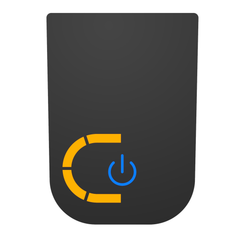
Prior to seeking customer support, we recommend that customers try a few troubleshooting steps on their own. Please reference the Error Codes document below. If your unit is displaying codes 1-4, please read the section(s) below respective to the code you’re seeing. For codes 5-11, please reach out to Customer Support directly at support@foodcycler.com so that we can assist you further.
This code sequence occurs at the beginning of your cycle. No action is required – your unit is running normally!
This sensor indicates that your Carbon Filter pellets are ready to be replaced OR that 500 cycle hours have elapsed since you last reset your filters. If the sensor goes off, but you are not experiencing odours, you may continue to run your unit as usual. The Change Filter light is merely an indicator that 500 cycle hours have elapsed.
This sensor indicates that your unit is experiencing temperatures which are either too high or too low for it to run efficiently (within 0°-60° C (32º-140º F). Try moving the unit to a room-temperature environment and attempt to run another cycle. If the error code persists, please contact Customer Support at support@foodcycler.com.
This sensor indicates that your unit is experiencing a motor overload. If this is caused by a blockage in the Bucket, try the following steps: 1) If the Bucket is jammed due to food waste coagulating along the Bucket interior and blades, we recommend pouring boiling water into the bucket and letting the Bucket contents soak for about 10 minutes. 2) Attempt to dislodge the blockage with a tool or kitchen implement (CAUTION: do not use your hands to dislodge the blockage as the Bucket blades are extremely sharp and may cause injury). If the error code persists, please contact Customer Support at support@foodcycler.com.
[Eco 5] How can I clean my FoodCycler® Grinding Bucket?
If dried food waste is stuck to the Bucket, soak in warm soapy water to remove. While the Bucket can be cleaned in the dishwasher, doing so may reduce its lifespan. If the Bucket is jammed due to food waste coagulating along the Bucket interior and blades, we recommend pouring in boiling water and letting the Bucket contents soak before attempting to remove the blockage. Any residue stuck to the Bucket is caused by the oil/grease or moisture content of the unit cycle. For an all-natural clean, try cycling citrus peels by themselves! This will also help to eliminate any trapped odours in the unit’s ventilation system.
It’s normal to notice some dried food debris stuck to the sides or bottom of your Bucket after a cycle.
Tip: dry by-product can actually serve as a beneficial “dry mix” addition for the next cycle. As long as the grinding blade can fully rotate after emptying the Bucket, you can proceed to fill it for the next cycle.
CAUTION: Do not reach your hand into the FoodCycler® Eco 5™ Bucket, as the blades are extremely sharp.
[Eco 5] How much electricity does the unit consume?
Each cycle consumes an average of 1.5 kWh per cycle, which is roughly equivalent to having a desktop computer running for the same amount of time as the cycle. Depending on where you live, each cycle should not cost you more than a couple of cents.
The FoodCycler® has built-in sensor technology that monitors the dryness and humidity of the food waste. Once complete, the unit will stop the cycle automatically.
[Eco 5] How much electricity does the unit consume?
Each cycle consumes an average of 1.5 kWh per cycle, which is roughly equivalent to having a desktop computer running for the same amount of time as the cycle. Depending on where you live, each cycle should not cost you more than a couple of cents.
The FoodCycler® has built-in sensor technology that monitors the dryness and humidity of the food waste. Once complete, the unit will stop the cycle automatically.
[Eco 5] How do I reset my Change Filter light?
After you replace your carbon filter pellets, press and hold the Power button for 3 seconds, release, and then hold again for another 3 seconds until you hear an audible tone to reset the Carbon Filter Replacement reminder.
[Eco 5] Why is my FoodCycler® emitting an odour?
This is normal! The unit could be emitting an odour for a variety of reasons.
The carbon filtration systems in each FoodCycler® are required to ensure a near-odourless cycle. They last approximately 500 cycle hours, or 3-4 months with regular use.
Even if the ‘Replace Filter’ light has not gone on yet, you may need to switch out your filter carbon. Similarly, you can continue cycling even if the filter light has gone on and no odours are apparent.
Filter life is determined by the moisture quantity in the food waste, and the intensity of odours of each cycle. If you are cycling rotten, smelly or potent food wastes (such as rotten meat, fish or old cheese) your filters may not last as long as if you were cycling simple veggie scraps and coffee grounds.
Tip: Running a cycle of mostly citrus peels will not only help keep your Bucket clean, it also eliminates any trapped odours in the unit’s ventilation system.
[Eco 5] How does the FoodCycler® work?
The FoodCycler® food waste recycler greatly reduces food waste volume, odors, liquids, bacteria and methane gasses that would otherwise be generated by putting your food waste in the trash.
The FoodCycler uses a multi-phase cycle which aerates and pulverizes food waste to a fine, dry, odourless powder which can be used in gardening applications.
For more details, visit our How It Works page!
[Eco 5] How much food waste can the unit cycle at one time?
5L (1.3 gallons)
We recommend keeping the contents below the indicator line level to avoid jams. For more information, visit the Eco 5 product page!
[Eco 5] Can I add food waste to The FoodCycler® once I’ve already started a cycle?
Yes, you can add additional food waste to the FoodCycler® Eco 5™ once the cycle has already begun. For best results, and to avoid extending the cycle period, we recommend adding food waste early in the cycle- or within the first hour and a half of cycling. Adding food waste midway through the cycle may result in unprocessed food waste at the end of the cycle, as this extends the dehydration and grinding process. If this occurs, we recommend starting a second cycle until the food waste has been completely broken down.
[Eco 5] Can The FoodCycler® process bones?
Yes, the FoodCycler® Eco 5™ can process fish, chicken, pork, lamb and other small bones. Large bones can cause jams or damage all units’ Bucket grinding gears.
[Eco 5] What can The FoodCycler® process?
The chart below show the “Do’s & Don’ts” of FoodCycling – for more information, visit the Eco 5™ Product Page!